Knowing how to identify email phishing is the most important digital security skill that any person or company can develop today. Phishing is the most common attack vector in security incidents worldwide, according to Verizon’s DBIR report—and in Brazil, CERT.br records fake websites used in this type of scam on a monthly basis, indicating that the problem is ongoing.
This guide explains how these attacks work, how to identify a fake email, and what specific steps you can take to keep your account secure.

What is phishing, and why is email the primary channel?
Phishing is a social engineering technique in which the attacker impersonates a trusted entity to convince the victim to click on a link, open a file, or provide personal information. Email is the preferred channel for scammers for obvious reasons:
- Cheap and easy to counterfeit
- Scales to serve millions of people simultaneously
- It can be customized with the victim's name and real information to make it look legitimate
- Most people still can't reliably identify a malicious email
According to Verizon’s 2024 DBIR, the median time for a user to click on a malicious link after opening an email is just 21 seconds, and another 28 seconds to enter their credentials. In other words, a well-executed attack is completed in less than 60 seconds. Brazilian data follows the same pattern: the CERT.br monitors fake websites used in phishing attempts in Brazil on a monthly basis, with consistent volume over the years in sectors such as banking, e-commerce, and webmail services.
How to Spot Email Phishing: Signs You Need to Recognize
Before taking any action, examine the email carefully. The most sophisticated scams mimic legitimate communications, but they almost always leave visible clues.
Check the sender carefully
The name that appears may be “Banco do Brasil” or “Netflix,” but the actual email address is what matters. Click on the sender’s name to see the full address. Common examples of spoofing:
- seguranca@banco-do-brasil.com.br.servico.net — the actual domain begins after the last slash
- noreply@netfl1x.com — subtle letter substitution
- atendimento@bradesco-digital.info — a generic domain that does not belong to the bank
Rule of thumb: The domain name after the @ symbol must be exactly the company's official domain name. Any variation is suspicious.
Be wary of urgency and threats
Phrases like “Your account will be blocked in 24 hours,” “Immediate action required,” or “You have been selected to receive a prize” are classic tactics designed to make you act without thinking. Legitimate emails rarely require immediate action with serious consequences.

Hover your mouse over the links before clicking
Before clicking on any link, hover your mouse cursor over it without clicking. The actual destination address will appear in the lower corner of the screen. If the address does not match the company's official website, do not click it.
Watch out for unexpected attachments
.exe, .zip, and .doc files with macros enabled, as well as .pdf files with embedded links, are common vectors for malware installation. Do not open attachments from unknown senders or those you were not expecting, even if the sender's name seems familiar.
Portuguese errors and strange formatting
Many phishing emails are automatically translated and contain grammatical errors, inconsistent formatting, or slightly distorted logos. Reputable companies have their communications proofread. If something seems “off,” it probably is.
7 Practical Steps to Protect Your Email Account
Identifying a suspicious email is your first line of defense. But there are structural measures you can take to make your account much harder to compromise, even if you happen to click on something you shouldn't.
1. Enable two-factor authentication (2FA)
Two-factor authentication is the most effective measure you can take right now. With it enabled, even if someone discovers your password, they won't be able to access your account without the second factor—usually a code generated by an app or confirmed via biometrics.
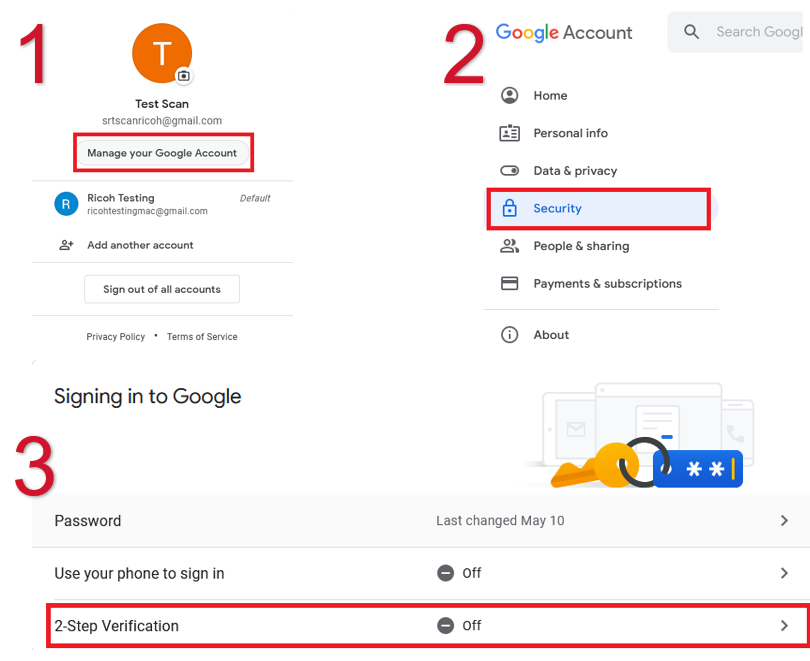
How to activate:
- Gmail: Settings > Security > Two-Step Verification
- Outlook: Account > Security > Two-Step Verification
- Yahoo Mail: Account Security > Two-Step Verification
Use authentication apps such as Google Authenticator or Authy instead of SMS, which can be intercepted via a SIM swap.
2. Use a strong, unique password
Your email password should not be used for any other service. If your password is compromised on any website, that could give someone access to your inbox—and from there, the ability to reset the passwords for all services linked to that email address.
Criteria for a strong password:
- At least 14 characters
- A combination of uppercase letters, lowercase letters, numbers, and symbols
- No dictionary words, birthdates, or names
Use a password manager such as Bitwarden, 1Password, or the built-in password manager from Google or Apple. These tools generate and store strong passwords without requiring you to memorize them.
3. Review the authorized access to your account
Go to your provider's security settings and check which apps and devices have access to your account. Revoke access for any you don't recognize or no longer use.
In Gmail: My Account > Security > Apps with access to your account.
4. Never enter your password on pages opened via links in emails
If an email asks you to click a link to confirm your information or update your password, do not use that link. Open your browser manually and go to the website by typing the address directly. This way, you can be sure you’re on the official website, not a fake one.
5. Keep your email system and client up to date
Known vulnerabilities in operating systems and email applications are actively exploited. Keeping everything up to date ensures that security patches are applied before they can be exploited. Enable automatic updates whenever possible.
6. Be careful with public Wi-Fi networks
Accessing your email on an unsecured public network exposes your traffic to interception. If you need to use public Wi-Fi, use a reliable VPN to encrypt your connection.
7. Monitor login activity on your account
Most providers log access history, including dates, times, and locations. Review this information periodically. If you notice an unknown access attempt, change your password immediately and revoke access for all connected devices.
What to Do If You Fall Victim to a Scam
If you clicked on a suspicious link or entered your credentials on a fake website, how quickly you respond is what determines the impact. Follow these steps:
- Change your password immediately — Access your email through the official website, not through the link you received.
- Enable or verify 2FA — to prevent the attacker from retaining access even with the old password.
- Revoke all active accesses — Force all connected devices to log out.
- Check the forwarding rules — Scammers often set up automatic forwarding so they can continue to receive your emails after you change your password. Make sure there are no unknown rules in effect.
- Notify the relevant departments — If the compromised email account is linked to bank accounts, social media accounts, or critical services, notify those services and change the associated passwords as well.
- File a police report — especially if there was financial loss. In Brazil, cybercrimes can be reported to the cybercrime police station in your state.
Email Security in the Corporate Environment
For businesses, the risk of phishing is amplified. A single employee who clicks on a malicious link can compromise the entire corporate network, expose customer data, and result in legal liability, especially under the LGPD.
Additional measures for organizations:
- Ongoing staff training on identifying suspicious emails
- Email filters with domain authentication (SPF, DKIM, DMARC) to block spoofed emails
- Password Policy and Mandatory 2FA to all employees
- Phishing simulations to test and educate without any real risk
- Incident Response Plan to act quickly in the event of a breach
A compromised employee is the most common entry point for corporate attacks. El Canary® supports organizations in implementing these measures as part of a structured information security strategy. Learn more about the El Canary Operations, a continuous operations service that includes vulnerability management and team awareness training.